Documents
Tahiti works primary with structured documents. Document in Tahiti is defined by document type, unique identifier, collection of pages and attributes. Document attributes are defined as part of document type definition. Document management system have to provide list of available document types and their definitions. This list is stored on the client side inside repository in the file cmserver2.xml or cmserver3.xml. File is usually downloaded when user connect to the system. When application is offline last downloaded file is used.
Configuration files for document management system:
cmserver2.xml- document types and attributes (legacy system)cmserver3.xml- document types definition (recommended version, used for new systems)presentation.xml- define views and document structure
All document types which can be displayed in the Tahiti have to be defined in the definition file. Undefined document types cannot be displayed nor processed.
There is example of document hierarchy and types in the Tahiti distribution. It is definition of documents in the accounting system.
Document Types
Each document stored in the document management system must have assigned document type.
Document type definition consist from several items:
document type identification
document name
flag if new documents can be created
class attributes - attributes associated with document type, these attributes are read-only
document attributes - attributes associated with document instance
Document name should be clearly understandable for user. Prefix in document name is often used for easier document type selection - e.g. „I0 - Invoices Out“. Deprecated document types can be marked with flag as non-creatable, such types are valid for viewing but not for creating new documents.
Class Attributes
Class attributes are attributes associated with document type which are read-only for document. This attributes can be used for document classification, description, sorting etc.. Example of class attribute: „Department“ with values „Research“, „Marketing“, „Public Relations“.
Class attribute is associated with document type and has defined value.
Document Attributes
Document attributes are created when document instance is created. New attribute is initialized with empty value and is identified by name. Attribute definitions are in the document type definition file (cmserver2.xml, cmserver3.xml). It is also possible to specify rules for attribute values - like mask, attribute length. All attributes are transferred together with the document.
Format of cmserver2.xml
cmserver2.xml is obsolete format for exchanging document types. File format definition is part of the Programmers Guide.
Format of cmserver3.xml
cmserver3.xml is recommended format for exchanging document types. File format definition is part of the Programmers Guide.
Document Tree
Documents on the client side are organized in the tree. Structure of this tree is defined in the file presentations.xml. Tree should allow users to have a good orientation in the documents and quickly find required information. Tahiti support several document hierarchies and user can switch between these views on the fly.
Document hierarchy is based on the attributes and their values. Attributes are defined in the cmserver2.xmlor cmserver3.xml.
Document Attributes
There are several system attributes which are defined for each document in the tree.
Attribute |
Description |
|---|---|
name |
Document type name |
Document.id |
Document identifier, identifier is received from the server. New document has empty value. |
Document.id_internal |
Document identifier in the Tahiti. This value has runtime specific value. Value can be used only to distinguish between documents. |
Document.version |
Document version. Value is received from the server |
Document.serverVersion |
Document version. Second version value can be used for internal server operation. Client should not depend on this value |
Document.readonly |
Document read-only flag.
|
Document.type |
Identifier of document type. Document types are defined in the |
Document.modified |
Modification flag.
|
Task.name |
Name of connected task. This attribute can be used only in the presentation to check if document is part of task. |
Filters
It is possible to use one or more trees to display documents. Number of used trees can be adjusted by setting variable DocTree.TreeCount. By default one tree will be used. Each tree can be used for different kind of documents or use same view.
File Format of presentations.xml
File contain document tree definition and definition of views. One document hierarchy is called „Presentation“. File contain:
Simple hierarchy - used for document type selection
Dynamic views - used for document organization in the tree
Simple hierarchy
Simple hierarchy is used for document type selection and organization of document types. Organization is based on the class attributes and their values.
<?xml version="1.0"?>
<ViewSettings>
  <BasicHierarchy>
    <HierarchyItem name="BOOK_KEEPING__AREA"/>
  </BasicHierarchy>
</ViewSettings>
Simple hierarchy definition is stored inside the tag <BasicHierarchy>. Tag contain list of <HierarchyItem> with defined attribute name. This attribute have to contain class attribute value used for sorting. Such attribute should be defined for all document types.
Views
Views are defined in section <Presentations> in the presentations.xml. View can be defined one for all document types but also specialized for each one. View define levels in the tree and displayed values.
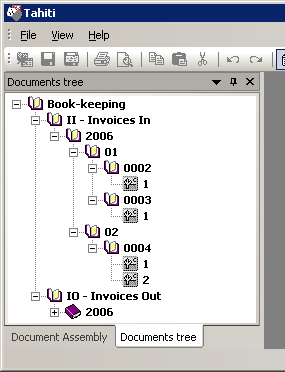
<?xml version="1.0"?>
<ViewSettings>
 <BasicHierarchy>
  <HierarchyItem name="BOOK_KEEPING__AREA"/>
 </BasicHierarchy>

 <Presentations>
   <Presentation name="Area/Year/Period">
     <Document type="Tahiti.rootDocument">
       <Level text="%BOOK_KEEPING__AREA%" cond="-"/>
       <Level text="%name%" cond="-"/>
       <Level text="%BUSINESS_YEAR%" cond="-"/>
       <Level text="%PERIOD%" cond="%PERIOD%"/>
       <Level text="%FILE_NUMBER%" cond="-"/>
       <ShortDesc text="%Page.number%"/>
       <LongDesc text="%Page.number%-%CISLO_JEDNACI%"/>
       <VersionDesc text="Version-%Document.version%"/>
     </Document>
   </Presentation>

   <Presentation name="Year/Period/Area">
     <Document type="Tahiti.rootDocument">
       <Level text="%BUSINESS_YEAR%" cond="-"/>
       <Level text="%PERIOD%" cond="%PERIOD%"/>
       <Level text="%BOOK_KEEPING__AREA%-%name%" cond="-"/>
       <Level text="%FILE_NUMBER%" cond="-"/>
       <ShortDesc text="%Page.number%"/>
       <LongDesc text="%Page.number%-%CISLO_JEDNACI%"/>
       <VersionDesc text="Version-%Document.version%"/>
     </Document>
   </Presentation>

 </Presentations>
</ViewSettings>
Views are defined inside tag <Presentations>. Each view is identified by name and defined inside tag <Presentation>. Name is displayed in the user interface as the view identification. At least one tag <Presentation> have to be defined.
View
View definition can be one for all document types or specialized only for some types. Common view is defined inside tag <Document> with attribute type="Tahiti.rootDocument". Specialization of view is done by setting attribute type to the document type.
Tag name |
Description |
|---|---|
|
Level definition, displayed in the tree. Level is displayed when associated condition is not empty. |
|
Page name, displayed in the tree |
|
Page name, displayed as the view name |
|
Version name, displayed in the tree when more versions of one document are downloaded. |
Level
Tag <Level> defines one level in the tree. Text displayed in the tree is defined in the attribute text. Condition if level will be displayed can be set in the attribute cond. Level is displayed if condition is not empty. Order of nodes in the same level can be set int the attribute sort.
<Level text="%NUMBER%" cond="-"/>
<Level text="Number - %NUMBER%" cond="%NUMBER%" sortBy="%NUMBER%"/>
It is also possible to define conditional level. Definition is on the next example.
<Level>
  <Case text="%NUMBER%" cond="%NUMBER%"/>
  <Case text="%YEAR%-%PERIOD%" cond="%YEAR%%PERIOD%"/>
  <Case text="%YEAR%" cond="%YEAR%"/>
  <Case text="unknown"/>
</Level>
Tag <Case> contain same attributes as the <Level>, meaning is also same.
Filter
It is possible to possible only specific kind of documents in the view. Such approach can be useful to distinguish between newly created documents and received documents from the information system.
Document types:
new document
received document
task document
Filter type |
Description |
|---|---|
0 |
Display all items |
1 |
Display only new documents (created by user). |
2 |
Display only existing documents (downloaded from the server). |
3 |
Display only documents connected with the task. These documents have to be process by user and committed back to the server. |
4 |
Display existing documents and tasks. Combination of filter 2 and 3. |
5 |
Display new documents and tasks. Combination of filer 1 and 3. |
6 |
Display new documents existing documents which are not part of any task. Combination of filer 1 and 2. |
Used filter can be defined as part of presentation. There is optional parameter filter. If this parameter is not set no filter is used (all items are visible).
<Presentation name="Area/Year - New documents"
                filter="1">
     ......
</Presentation>